

Atlassian has set a hard deadline: Data Center reaches end of life on March 28, 2029.
Most IT teams know the date exists, but fewer have internalized what it actually means for day-to-day operations, or how much risk accumulates between now and then. Staying on Data Center for as long as possible isn’t playing it safe. It’s a choice to absorb an increasing amount of security exposure, feature debt, and operational fragility, right up until the moment your tools stop working as you need them to.
The Timeline You Need to Know
Atlassian’s Data Center wind-down is happening in stages. Here are the dates that matter:
- March 30, 2026 — End of sale for new Data Center customers. No new DC licenses will be issued after this date.
- March 30, 2028 — Last date for Data Center license renewals. After this, you can no longer extend your DC subscription.
- March 28, 2029 — End of life. Support is completely discontinued, no more product updates ship, and per Atlassian, DC instances will no longer be actively usable. They switch to read-only mode.
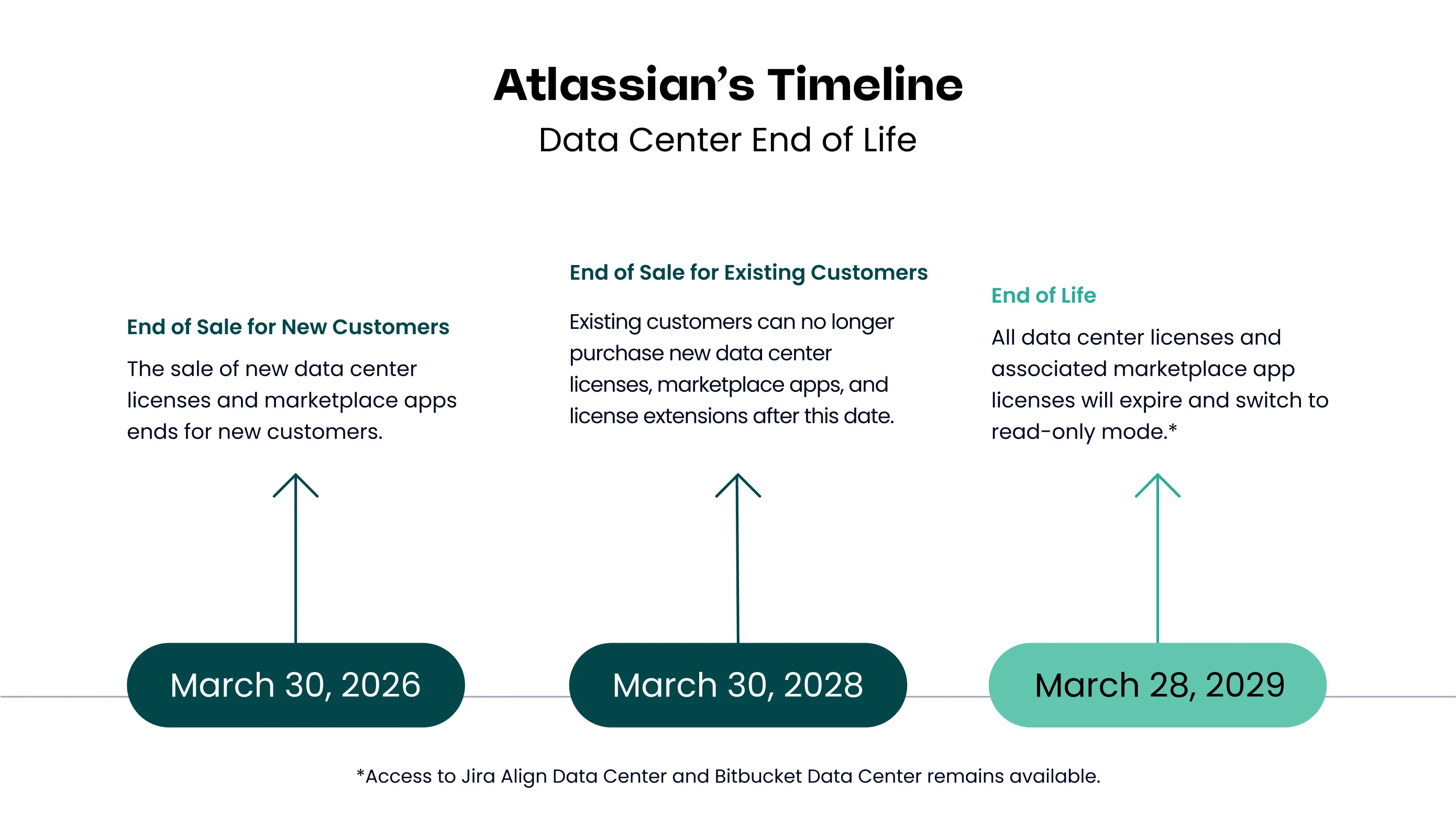
The renewal window for new customers closes on March 30, 2026. And the full shutdown follows a year after that.
See the full Atlassian Data Center end-of-life timeline →
The Security Gap Is Already Widening
This is the risk that tends to get underestimated, because it doesn’t announce itself with a hard deadline. But it’s happening now.
Atlassian’s security investment is increasingly concentrated in Cloud. Features like Atlassian Guard — which provides threat detection, data loss prevention, data classification, and centralized audit logging — are Cloud-only. If you’re on Data Center, you don’t have access to them. Your security posture depends entirely on what your team can build and maintain manually: infrastructure hardening, access controls, patch management, and monitoring.
That’s a significant burden, and it grows heavier every quarter. After March 2029, it becomes untenable. Known CVEs will go unpatched. Atlassian will no longer issue security fixes for Data Center products, which means vulnerabilities discovered after EOL have no official remediation path.
For teams operating under compliance frameworks — SOC 2, ISO 27001, HIPAA, FedRAMP — this isn’t just a technical problem. Auditors and regulators require supported, patched software. Running an unsupported platform puts certifications at risk, and in regulated industries, that’s not an abstract concern.
You’re Already Falling Behind on Features
The feature gap between Data Center and Cloud isn’t coming in 2029. It’s here now, and it widens every time Atlassian ships a Cloud release.
Atlassian Intelligence — the suite of AI-powered capabilities built into Jira and Confluence — is Cloud-only. That includes smart issue summaries, AI-assisted search, automatic meeting notes in Confluence, and natural language query support. Rovo, Atlassian’s AI assistant for knowledge discovery and task automation across your tools, is also exclusively available to Cloud customers.
Beyond AI, the list of Cloud-only capabilities includes:
- Real-time collaborative editing in Confluence
- Inline comments and page reactions
- Dynamic forms and conditional logic in Jira
- Automatic product upgrades — no maintenance windows, no manual patching cycles
- Deeper integrations with tools like Slack, Microsoft Teams, and Google Workspace
Atlassian’s development velocity is almost entirely directed at Cloud. New features ship there first — and in many cases, they never come to Data Center at all. Every quarter your team stays on DC is a quarter they’re working without tools that Cloud users take for granted.
What Read-Only Mode Actually Means for Daily Work
This is the part of the EOL conversation that tends to get glossed over — and it shouldn’t.
When Atlassian Data Center reaches end of life in March 2029, support will be completely discontinued. There will be no more product updates. According to Atlassian, the corresponding product instances will no longer be actively usable and will switch to read-only mode.
Think through what that means concretely for your team:
- Jira issues can’t be created, updated, or closed
- Sprint boards can’t be managed — no moving tickets, no starting or completing sprints
- Confluence pages can’t be edited, created, or published
- Approvals, service desk requests, and workflows stop functioning
- Integrations and automations that write back to Jira or Confluence break
Your tools become an archive, not a workspace. Teams can view what’s there, but they can’t act on it.
For organizations that discover this mid-project, mid-sprint, or mid-incident, the impact isn’t an inconvenience — it’s a crisis. And if you’re in a regulated environment where Jira or Confluence is part of your documented workflow or audit trail, a sudden shift to read-only has compliance implications that go well beyond IT.
The risk here isn’t just operational disruption. It’s the loss of your team’s ability to work, without warning, with no rollback option once the deadline passes.
The Migration Window Is Narrowing
Here’s the thing about Atlassian Cloud migrations: they take time. Depending on your product stack, the number of apps and integrations you’re running, your data volume, and how customized your Jira workflows are, a well-executed migration typically takes anywhere from three to twelve months.
That math matters. If you’re targeting a comfortable migration with proper planning, user training, and a tested cutover — not a rushed one — then:
- Starting in 2028 means you’re up against the renewal deadline with no margin
- Starting in 2027 gives you a workable window, but leaves little room for complexity
- Starting now means you can do this right: phased, tested, and on your terms
The teams that wait until the pressure is undeniable are the ones that end up cutting corners — compressing timelines, skipping user training, or migrating before the configuration is properly validated. Those migrations work, but they create problems that take months to untangle afterward.
A structured migration with an experienced partner looks different. It starts with an assessment of your current environment, maps your apps and custom configurations (we’ve put together a step-by-step Marketplace app audit guide if you want to get ahead of this), plans the cutover sequence, and puts a clear timeline in place before anyone touches production data. Done properly, your team lands in Cloud with their workflows intact and the tools they need ready to go.
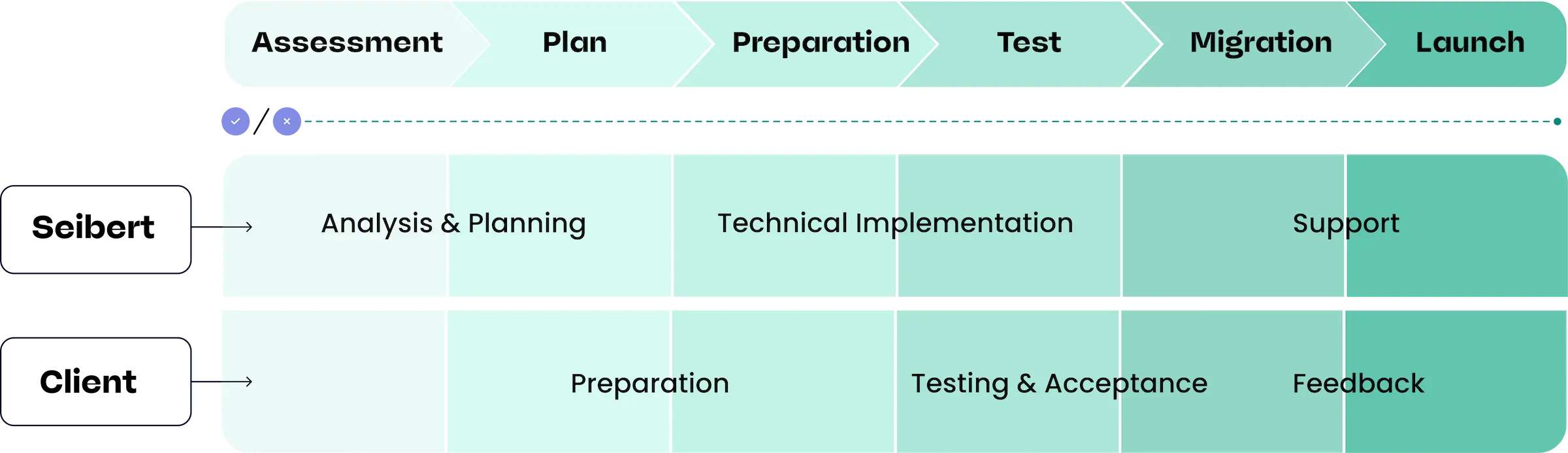
See how Uelzener approached their migration to Atlassian Cloud: Read the case study
And for the financial case: how to build the ROI argument internally →
Staying on Data Center Is the Risky Choice
There’s a tendency to frame migration as the disruption to avoid and staying put as the safe default. That framing is backwards.
Every month on Data Center is a month of accumulating security exposure, feature debt, and distance from a cloud environment your team will eventually need to move to anyway. The disruption isn’t migration — it’s the operational reality of running an unsupported, read-only platform when the deadline passes and your team can no longer do their work.
The organizations that will handle this transition most smoothly are the ones that started planning early, chose a partner with real migration experience, and treated the move as a strategic initiative — not an emergency response.
If you’re an IT lead or Jira admin trying to figure out where to start, or how to build the internal case for migration, that’s exactly what we can help with.
Talk to the Seibert Solutions team about your Data Center migration →