
If you’re an IT director or IT manager running Atlassian tools on Data Center, you probably already know that Cloud is where things are headed. The harder problem isn’t figuring out the right move — it’s convincing your CFO or board to fund it.
Executives hear “cloud migration” and their minds go straight to cost, risk, and disruption. So they push it down the priority list. But here’s what makes this situation different: migrating off Atlassian Data Center isn’t just a smart strategic move. It’s a necessary one.
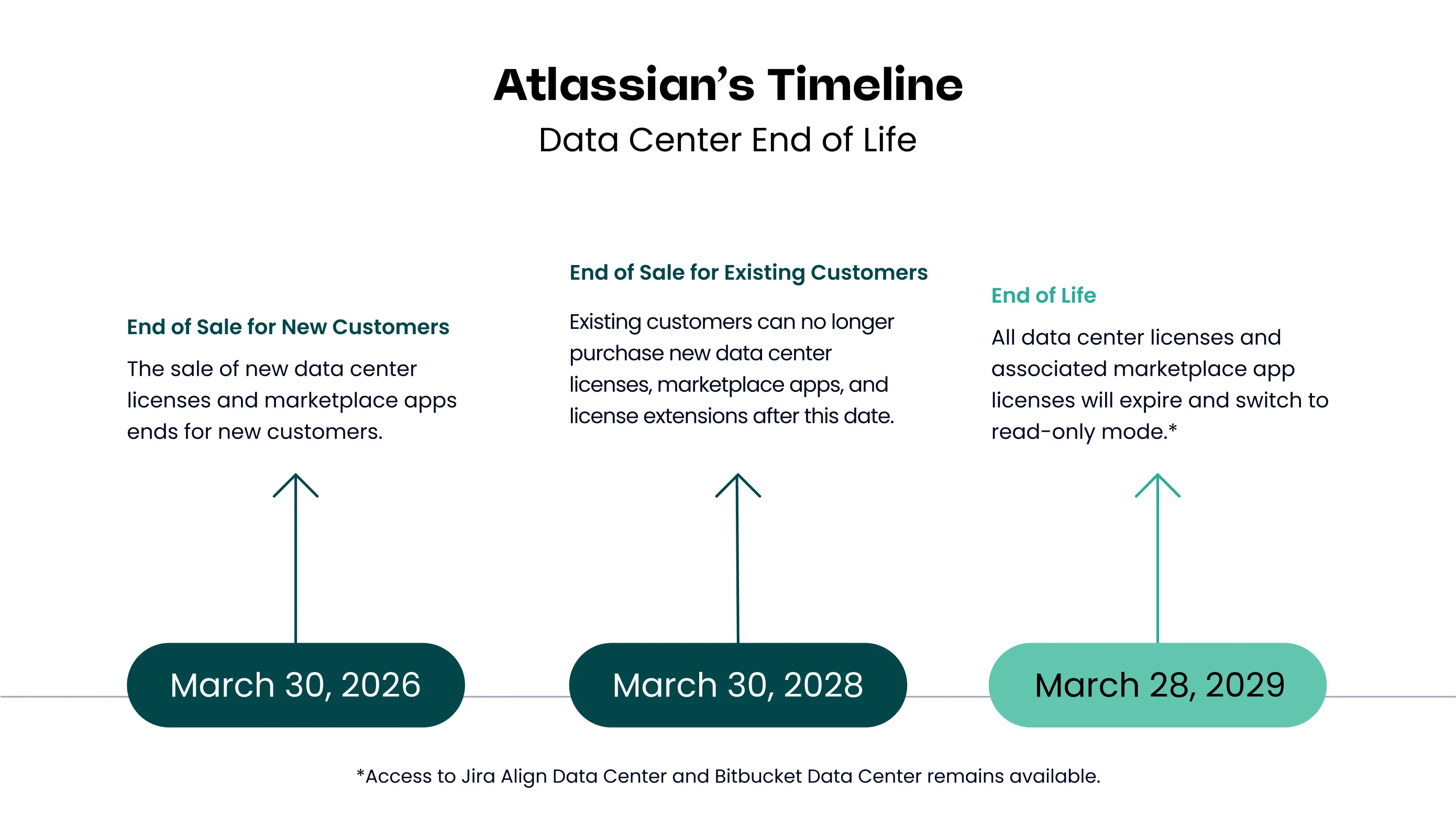
Atlassian has announced Data Center end-of-life for March 2029. After that date, your instances on Data Center become read-only. There will be no new releases, no security patches, and no vendor support. If your organization wants to keep using Jira, Confluence, and the rest of the Atlassian suite, Cloud is the only path forward.
The question isn’t whether to migrate. It’s whether you do it on your terms or under pressure. This guide will help you build a business case that gets your leadership team to “yes”.
Start With the End Date, Not the Price Tag
Most internal business cases for migrations fail before they get off the ground because they lead with the migration cost. Don’t do that. Lead with the deadline and what it means.
Atlassian Data Center reaches end-of-life on March 28, 2029. That means:
- All Data Center licenses and associated Marketplace app licenses will expire and switch to read-only mode.
- No security patches or vulnerability fixes after that date.
- No new feature releases or bug fixes.
- No vendor support if something breaks.
Running unsupported, read-only enterprise software is not a viable option for any organization. It creates audit exposure, compliance gaps, and breach liability that will far outweigh whatever you’re saving by delaying. Your CFO may not care much about software lifecycle management — but they do care about regulatory risk and the cost of a security incident.
Frame it this way: this is not an “if,” it’s a “when.” The business case is about doing it well, with enough runway to plan properly, rather than scrambling in 2028 when every other Atlassian DC customer is trying to do the same thing.
Quantify the Cost of Where You Are Today
Before you build the case for Cloud, build the case against the status quo. Most organizations underestimate what they’re actually spending to keep Data Center running.
Pull together the full picture:
Direct infrastructure costs
- Hardware: servers, storage, networking equipment and refresh cycles
- Hosting or colocation fees
- Maintenance contracts and support agreements
- Energy and cooling (if on-premises)
IT labor costs
- Staff time spent on upgrades, patching, and routine maintenance
- Incident response for on-prem outages and performance issues
- Administration overhead that doesn’t exist in a managed cloud environment
License costs
- Current annual Data Center license fees
- Projected renewal increases — Atlassian has consistently raised DC pricing, and there’s no indication that trend will reverse
When you add all of this up and express it as a loaded annual cost, the picture often looks very different than the line item on the IT budget. You’re not just paying for licenses. You’re paying to operate and maintain an infrastructure that has a firm expiration date.
Map the Risks of Staying on Data Center
Risk framing is often more persuasive to a CFO or board than cost savings alone. There are several distinct risk categories worth calling out explicitly.
Post-EOL security and compliance exposure. After March 2029, any vulnerability discovered in Atlassian Data Center software will go unpatched. If your organization is subject to SOC 2, ISO 27001, HIPAA, or any other compliance framework, running unsupported software will almost certainly create audit findings — and potentially disqualify you from certification renewal.
Rising and unpredictable DC licensing costs. Atlassian has signaled clearly that their investment and pricing focus is on Cloud. Data Center customers can expect pricing increases to continue with limited corresponding feature value.
Falling behind on capabilities. Cloud gets new Atlassian features first — and some features are Cloud-only. Atlassian Intelligence, the AI layer built into Jira and Confluence, is not available on Data Center at all. The capability gap between DC and Cloud will widen, not narrow, between now and 2029.
Talent and toolchain alignment. Modern engineering and product teams increasingly expect cloud-native tooling. Organizations running legacy on-prem infrastructure face a quiet but real disadvantage in recruiting and in integration with the broader SaaS ecosystem.
Build the ROI Model
Now you have the foundation: a clear deadline, a quantified status quo cost, and a defined risk picture. The ROI model pulls this together into a comparison your CFO can evaluate.
Structure it as a three-year total cost of ownership (TCO) comparison. Year-one-only comparisons often favor the status quo because migration has upfront costs. The real story is in years two and three.
Hard savings to model:
- Elimination of hardware refresh, hosting, and infrastructure maintenance costs
- Reduction in IT staff hours for maintenance and upgrades, expressed as loaded salary cost
- Avoided DC license renewal increases
Soft savings to quantify where possible:
- Reduced admin burden with cloud-native user management and provisioning
- Productivity gains from Cloud-only features and tighter integrations
- Improved uptime reliability with Atlassian-managed SLAs vs. self-managed infrastructure
Risk mitigation value:
- Estimated cost of a security incident on eventually-unsupported infrastructure
- Compliance remediation costs avoided
- Cost differential between a planned migration and an emergency one — rushed migrations in 2028 will be more expensive, more disruptive, and harder to staff
A good TCO model doesn’t need to be perfectly precise to be persuasive. Even conservative estimates typically show that the cost difference between DC and Cloud is much smaller than it appears when infrastructure and labor are fully accounted for. We’ve put together a sample migration assessment that shows what this analysis typically looks like in practice, when working with an Atlassian Solution Partner.
Loading content...
Get Ahead of the Objections
If you’ve done the work above, you’ll go into the conversation with your leadership team in a much stronger position. But a few objections come up consistently — address them in your document before they get raised in the room.
“Cloud is more expensive.” Show the 3-year TCO with full infrastructure and labor costs included. The gap is almost always smaller than it appears when you’re only comparing license line items. And that’s before accounting for the cost of a last-minute migration.
“We’ll lose control of our data.” Atlassian Cloud offers data residency options that let you specify where your data is stored. The platform is SOC 2 Type II and ISO 27001 certified, and in many cases offers stronger security guarantees than self-managed infrastructure. See the full FAQ on Cloud migration data and security questions.
“Migration is too risky and disruptive.” A well-planned phased migration is far less disruptive than a rushed one. Atlassian provides tooling specifically designed to support DC-to-Cloud migrations, and an experienced migration partner can de-risk the process significantly. This is exactly why starting now — with three years of runway — matters.
“We have custom integrations and apps that won’t work.” The Atlassian Marketplace Cloud app ecosystem has matured considerably. The majority of widely-used DC apps now have Cloud equivalents. A migration assessment includes an app and integration audit so you know exactly what your migration path looks like before you commit. If you want to get a head start, here’s how to audit your Marketplace apps before your formal migration begins.
Frame It as Strategy, Not Just Compliance
The 2029 deadline creates the urgency, but the business case shouldn’t read like damage control. Cloud is genuinely a better operational environment for most organizations — not just a mandate.
Connect Cloud capabilities to your organization’s broader goals:
- Scaling without overhead: Cloud scales with your headcount without requiring infrastructure changes or additional IT capacity
- Distributed team support: Cloud-native access management, permissions, and collaboration tools are built for the way modern teams actually work
- AI-powered productivity: Atlassian Intelligence — available only in Cloud — brings AI-assisted summaries, issue drafting, and search directly into Jira and Confluence
- Better integrations: Cloud offers tighter, more reliable integrations with the broader SaaS ecosystem your teams are already using
The deadline means you have to move. But Cloud is also where Atlassian is investing, where new capabilities are being built, and where your organization will be better positioned to operate. That’s worth saying out loud in your business case.
See how the team at VR Payment is using Atlassian Cloud to scale their business: Read the case study
Why Starting Now Beats Waiting
With March 2029 as the deadline, it might feel like there’s plenty of time. There isn’t — not if you want to do this well.
Organizations that start planning now have the runway to:
- Conduct a thorough app, integration, and data audit without time pressure
- Design a phased migration that minimizes disruption to active teams
- Build internal capacity and train administrators before go-live
- Negotiate licensing terms from a position of deliberate choice, not deadline pressure
- Work with a migration partner on your schedule, not theirs
Organizations that wait until 2028 will find themselves competing for partner capacity, making faster decisions than the situation deserves, and absorbing higher costs across the board. The business case isn’t just “Cloud is better.” It’s “starting now is materially cheaper and less risky than waiting.”
Structure Your Executive-Facing Document
When you bring this to your CFO or board, format matters. Keep the main document tight and put the technical detail in appendices.
A strong structure:
- Executive summary (one page max): the 2029 deadline, your recommendation, and the payback period
- Current state and cost baseline: what you’re spending today, fully loaded
- Migration options and recommendation: a brief comparison with a clear recommendation
- 3-year TCO comparison: the numbers, presented visually where possible
- Risk analysis: post-EOL exposure, compliance implications, and the cost of delay
- High-level implementation roadmap: phases, rough timeline, key milestones
- The ask: budget, timeline, and executive sponsor needed
Executives read the summary and the ask. Everything else exists to support questions they might raise.
Working With a Migration Partner
One of the most effective ways to strengthen your business case is to involve an Atlassian Solution Partner early in the process. A partner can provide a migration assessment that includes license cost modeling, an app and integration gap analysis, a risk review, and reference customers from comparable organizations.
This does two things: it adds independent credibility to the numbers you’re presenting, and it gives leadership confidence that there’s a defined path forward, not just a proposal.
See how Seibert Solutions approaches DC-to-Cloud migrations — including what a migration assessment covers and what the typical process looks like.
The Bottom Line
The companies that navigate this transition well are the ones that start early, build a complete picture of their current costs, and frame the migration as a planned investment rather than a reactive scramble.
Your CFO needs numbers, risk context, and a clear recommendation. You now have the framework to provide all three.
If you want help building the actual numbers for your environment, we offer a DC-to-Cloud migration assessment that gives your executive team peace of mind — with the specificity that turns a business case from a proposal into a decision.