
Most Atlassian DC-to-Cloud migrations take between 3 and 18 months, depending on your organization size, instance complexity, and approach. This article breaks down what that range actually means and what puts you on each end of it.
If you’re in early planning mode, a vague “it depends” isn’t useful. You need to be able to walk into a conversation with your leadership team, your project sponsor, or your board and say: here’s our realistic window, here’s what drives it, and here’s what we need to start doing now.
That’s exactly what this guide is for.
The Same Phases, Very Different Timelines
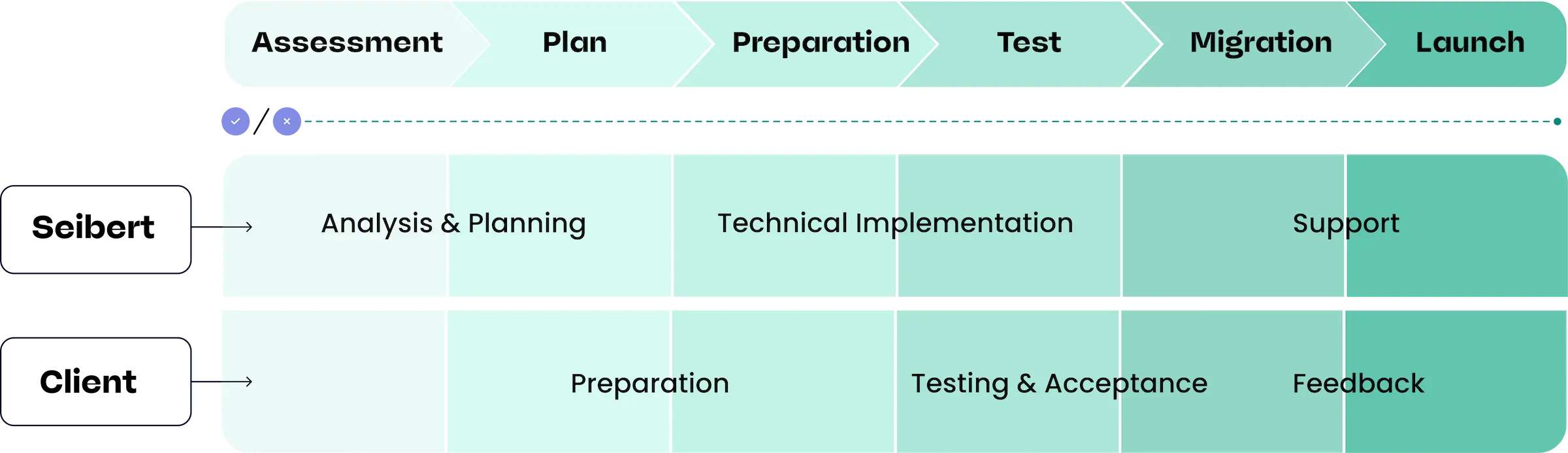
Every Atlassian cloud migration — regardless of size — goes through the same core phases. What varies is how long each phase takes and how complex it gets.
The phases look like this:
- Assessment and discovery: Audit your current Jira and Confluence instances — apps, integrations, users, data volume, and customizations. This is where you figure out what you’re actually working with.
- Planning and scoping: Define your migration approach, sequence, and success criteria. Identify integration owners and any dependencies that need to be resolved before you can move.
- Execution: The actual migration work — data migration, app cutover, user transition, and testing.
- Go-live and hypercare: Cutover to Cloud, monitor closely, and support users through the transition period.
Skipping or rushing the assessment phase is the single most common reason migrations run over timeline. Organizations that treat it as optional often hit surprises mid-execution that push go-live out by months. The time you invest upfront pays back significantly during execution.
Realistic Timelines by Organization Size
User count is a useful starting proxy for complexity, though it’s not the whole picture — we’ll get to the other variables in a moment.
Small organizations (under 500 users)
Typical timeline: 2–4 months
Smaller organizations with relatively straightforward instances are often the best candidates for a faster migration. If you have a manageable number of Marketplace apps, limited custom scripting, and a clean data set, a well-run migration can move quickly.
What pushes a small-org migration longer:
- A high number of third-party Marketplace apps, especially those without direct Cloud equivalents
- Heavily customized workflows or automations built up over years
- Limited internal IT bandwidth to run the project alongside day-to-day work
- Data cleanup that needs to happen before migration (stale users, archived projects that need decisions)
Even at the small-org tier, skipping assessment tends to cost more time than the assessment itself takes.
Mid-size organizations (500–5,000 users)
Typical timeline: 4–9 months
This is where complexity tends to kick in in earnest. Mid-size organizations often have a mix of Jira Software, Jira Service Management, and Confluence running together, with a larger app footprint, more integrations with other enterprise tools, and more stakeholders involved in sign-off.
The assessment phase becomes noticeably more involved at this scale. You’re likely dealing with multiple project leads who have opinions about their workflows, integration owners who need to be consulted, and an app list that requires careful review for Cloud compatibility.
What extends timelines in this range:
- Jira Service Management migrations (these tend to be more complex than software or business project migrations)
- Integrations with HR systems, identity providers, or enterprise security tooling
- Multiple business units with different go-live readiness levels
- Phased migration planning across instance segments
A phased approach — migrating by team, product area, or instance segment — is common at this tier and generally worth the added planning overhead.
Enterprise organizations (5,000+ users or multi-instance)
Typical timeline: 9–18+ months
Enterprise migrations are a different category of project. At this scale you’re often dealing with multiple Atlassian instances across business units or geographies, a large and varied app ecosystem, complex identity and access management requirements, and a stakeholder map that extends well beyond the IT team.
The planning phase alone can take two to three months. Building internal project capacity, aligning stakeholders across the organization, and sequencing the migration in a way that minimizes disruption to active teams takes real time.
What’s typical at enterprise scale:
- A dedicated internal project team, often with a migration partner engaged alongside them
- Phased execution over 6–12 months, with different teams or instances going live at different times
- Significant app and integration work before migration can begin
- A hypercare period of 4–8 weeks post-cutover before the project is considered complete
It’s also worth noting that enterprise-scale migrations starting in 2026 look very different from those starting in 2028. With the Atlassian Data Center end-of-life date set for March 2029, organizations at this tier reduce operational risk by starting their migration early.
What Actually Moves the Timeline
User count gives you a rough bracket. These variables are what move you within it — or beyond it.
Marketplace app count and Cloud compatibility
Each app in your current instance needs to be evaluated: does a Cloud equivalent exist? Is it functionally equivalent? Is there a migration path, or does data need to be exported, transformed, and re-imported? For organizations with 20–50+ apps, this work alone can add weeks to the assessment phase.
Custom scripts, automations, and workflows
ScriptRunner scripts, post-functions, custom validators, and heavily customized Jira workflows don’t automatically carry over. They need to be inventoried, reviewed, and rebuilt or replaced. The more customization has accumulated over the years, the more time this takes.
Integrations with other enterprise systems
Connections to HR systems, identity providers, CI/CD pipelines, and other enterprise platforms often need to be reconfigured or rebuilt for Cloud. Identifying integration owners early — and getting their availability committed to the project — is one of the things organizations most commonly underestimate.
Data volume and cleanup
Migrating years of historical data is manageable. Migrating years of messy data is not. Stale users, unarchived projects, and duplicate configurations add time to both assessment and execution. Organizations that do data cleanup before migration start in a significantly better position.
Internal resourcing and availability
This one is often overlooked. A well-scoped migration can still run long if the internal team is juggling it alongside other priorities. Getting dedicated project time committed — from IT, from app owners, from stakeholder approvers — is as important as the technical work.
Lift-and-Shift vs. Phased: How Your Approach Shapes the Timeline
How you migrate has almost as much impact on your timeline as the size and complexity of your instance.
Lift-and-shift means migrating everything in one cutover. It’s typically faster to execute and simpler to project-manage, since you’re not maintaining two parallel environments. It works well for smaller, less complex instances where the risk of a single cutover is manageable.
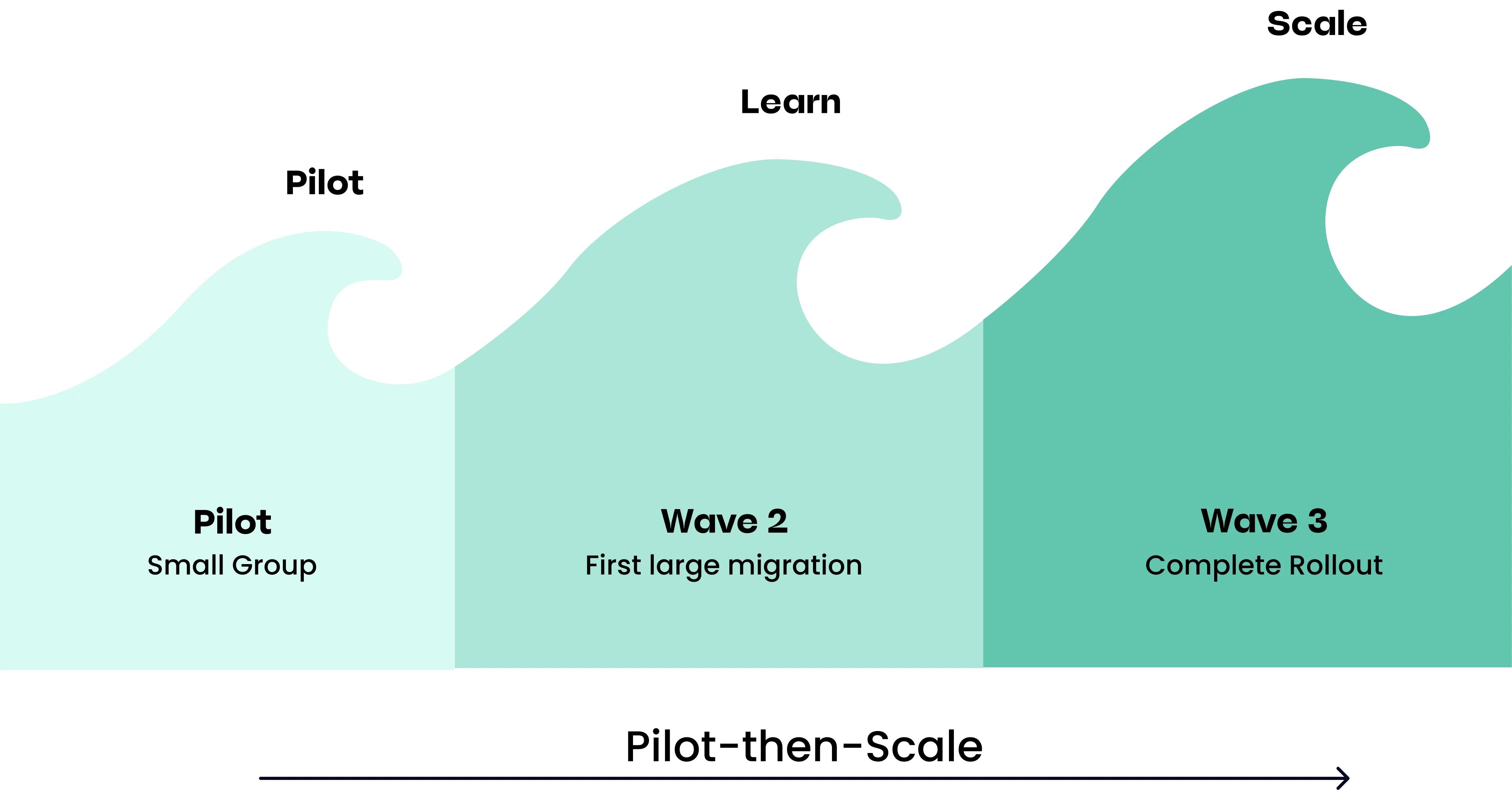
Phased migration means moving in segments — by team, by project type, by business unit, or by instance. The overall calendar duration is usually longer, but individual cutovers are smaller and lower-risk. Disruption to active teams is more contained, and you can learn from earlier phases before tackling the more complex ones.
For most mid-size and enterprise organizations, a phased approach is worth the added planning overhead. The question isn’t just “how do we get to Cloud?” — it’s “how do we get there without a disruption event that sets the project back in the eyes of the business?”
What You Can Do Right Now to Shorten Your Timeline
Regardless of where you are in the planning process, there are things you can do now that will directly compress your migration timeline later.
- Start the app audit. Pull your full Marketplace app list and check Cloud compatibility for each. This is something you can start before a formal project is kicked off, and the results will shape everything else. Here’s a step-by-step guide to auditing your Marketplace apps.
- Identify your integration owners. Map out every system that connects to your Atlassian tools and identify who owns each one. Getting these people involved early prevents the most common mid-project delays.
- Clean your data. Archive or delete stale projects, deactivate inactive users, and resolve any known data quality issues. Migrating clean data is faster and less likely to surface problems during testing.
- Align your internal project sponsor. Migrations stall when approvals and decisions don’t have a clear owner. Get executive sponsorship confirmed and defined before work begins.
- Start planning now, not in 2028. Organizations that begin the process with two or three years of runway have the luxury of doing this well. Those that wait will be competing for migration partner availability, making faster decisions than the situation warrants, and absorbing the cost of a rushed project. The business case for starting early is clear — the timeline math makes it even clearer.
Get a Timeline Built for Your Environment
A range is useful for planning conversations. A real timeline — built on your actual app inventory, instance complexity, and team capacity — is what you need to commit to a project.
Our DC-to-Cloud Migration Assessment gives you exactly that: a structured review of your current environment with a realistic migration timeline, an app and integration gap analysis, and a clear picture of what your path to Cloud actually looks like.
Ready to get a timeline that’s specific to your environment? Get in touch with our migration team and we’ll walk you through what a migration assessment covers and what your path to Cloud looks like from here.