

If you’re planning an Atlassian cloud migration and you’re running more than one Jira or Confluence Data Center instance, you’ve got a decision to make before you move anything: do you consolidate those instances first, or migrate them separately and sort it out in cloud? This article will help you reach the right answer for your organization.
Multiple Atlassian instances tend to accumulate in a few predictable ways. A company acquires another business and inherits their tools. A department stands up its own Jira because it couldn’t get what it needed from the central instance fast enough. An old server gets grandfathered in because nobody wanted to deal with the migration at the time. A regional office runs its own Confluence to stay autonomous.
Whatever the reason, the result is the same: separate instances with their own workflows, custom fields, user bases, and app configurations — and a cloud migration that just got significantly more complex.
Running multiple cloud sites is possible, but it adds real overhead. You’ll pay separately for each, manage users across each, and lose the benefits of a single connected Atlassian ecosystem. Atlassian’s own documentation on instance consolidation notes that separate instances commonly arise from acquisitions and team-level tool sprawl, and recommends consolidation specifically because it reduces ongoing administration complexity. That logic applies even more strongly when cloud is the destination.
Do You Actually Need to Consolidate Before Your Atlassian Cloud Migration?
Not necessarily — and this is worth working out before you invest time in a consolidation project that might not be required.
For Jira, Atlassian’s cloud migration methods for Jira make clear that the Jira Cloud Migration Assistant supports migrating multiple separate Data Center instances to the same cloud site without pre-consolidating them in DC. The main catch: project key conflicts. If two instances have projects sharing the same key, you’ll need to resolve that before either can be migrated.
For Confluence, the Cloud Migration Assistant for Confluence can be installed on each DC instance independently, letting you migrate spaces from multiple instances into the same Confluence Cloud site. Again, no pre-consolidation required — as long as every space across all instances has a unique space key. Atlassian’s cloud migration methods for Confluence confirm this is a supported path.
That said, there are situations where consolidating in DC first makes sense:
- Your instances have significant overlap in workflows, custom fields, or user bases that you’d want to rationalize regardless
- You want a single, well-scoped migration event rather than multiple staged ones with separate validation steps
- Your instances are tightly interdependent in ways that are much harder to untangle in cloud than on-prem
- Your team doesn’t have the bandwidth to manage multiple parallel migration tracks
If your instances are relatively independent and you’re comfortable handling key conflict checks, migrating separately is a reasonable path. If they’re deeply intertwined, consolidating first will save you more time than it costs.
Audit and Clean Up Before You Do Anything
Whether you consolidate in DC first or migrate instances separately, this step is non-negotiable: audit and clean up before you touch anything.
That means:
- Inventory everything: projects, spaces, custom fields, workflows, active users, and installed apps across every instance
- Archive stale data: projects and spaces that haven’t been active in years don’t belong in cloud — they add volume without value
- Remove inactive users: unused accounts add noise and can complicate user management after migration
- Audit your Marketplace apps: not every DC app has a cloud equivalent, and some that do work differently enough to require re-evaluation
We’ve covered both of these in depth: see our data cleanup guide and our Marketplace app audit guide. Atlassian also publishes pre-migration checklists for Jira and Confluence that are worth working through carefully before any migration work begins.
The time invested here pays off directly in a smoother migration — for every instance.
How to Consolidate Multiple Jira Data Center Instances
If you’ve decided to consolidate Jira instances in DC before migrating, here’s how to approach it:
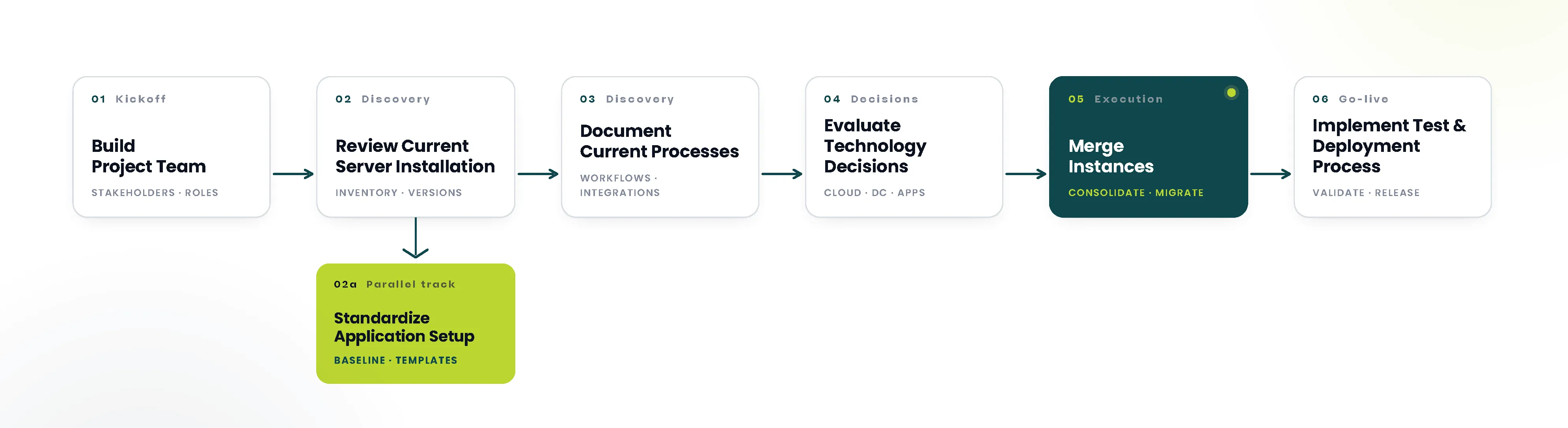
Pick a destination instance. Every other instance becomes a source. Your destination should be the most complete and well-maintained one — the instance whose workflows, custom field configuration, and permission schemes you’d want to carry forward.
Resolve project key conflicts first. If two instances share a project key, rename it in the source instance before you start any merge work. Trying to sort this out mid-merge creates unnecessary risk.
Merge one instance at a time. Atlassian’s guidance on merging multiple Jira Data Center instances is clear on this: build a timeline for merging each source instance sequentially and communicate any downtime windows to affected users well in advance. Attempting to run concurrent merges creates dependency and rollback headaches you don’t need.
Test in staging before touching production. Run the full merge process in a non-production environment first. This surfaces data conflicts, permission issues, and workflow clashes you can resolve before real users are affected.
Once all your instances are consolidated into one, you’re in a much cleaner position to run a single, well-scoped Atlassian cloud migration.
How to Consolidate Multiple Confluence Data Center Instances
For Confluence, the recommended approach is different from Jira. Rather than fully merging instances in DC first, you can install the Cloud Migration Assistant for Confluence on each DC instance and migrate spaces from multiple instances into the same Confluence Cloud site.
The assistant guides you through five steps: connect to cloud, choose what to migrate, check for errors, review the migration, and run it.
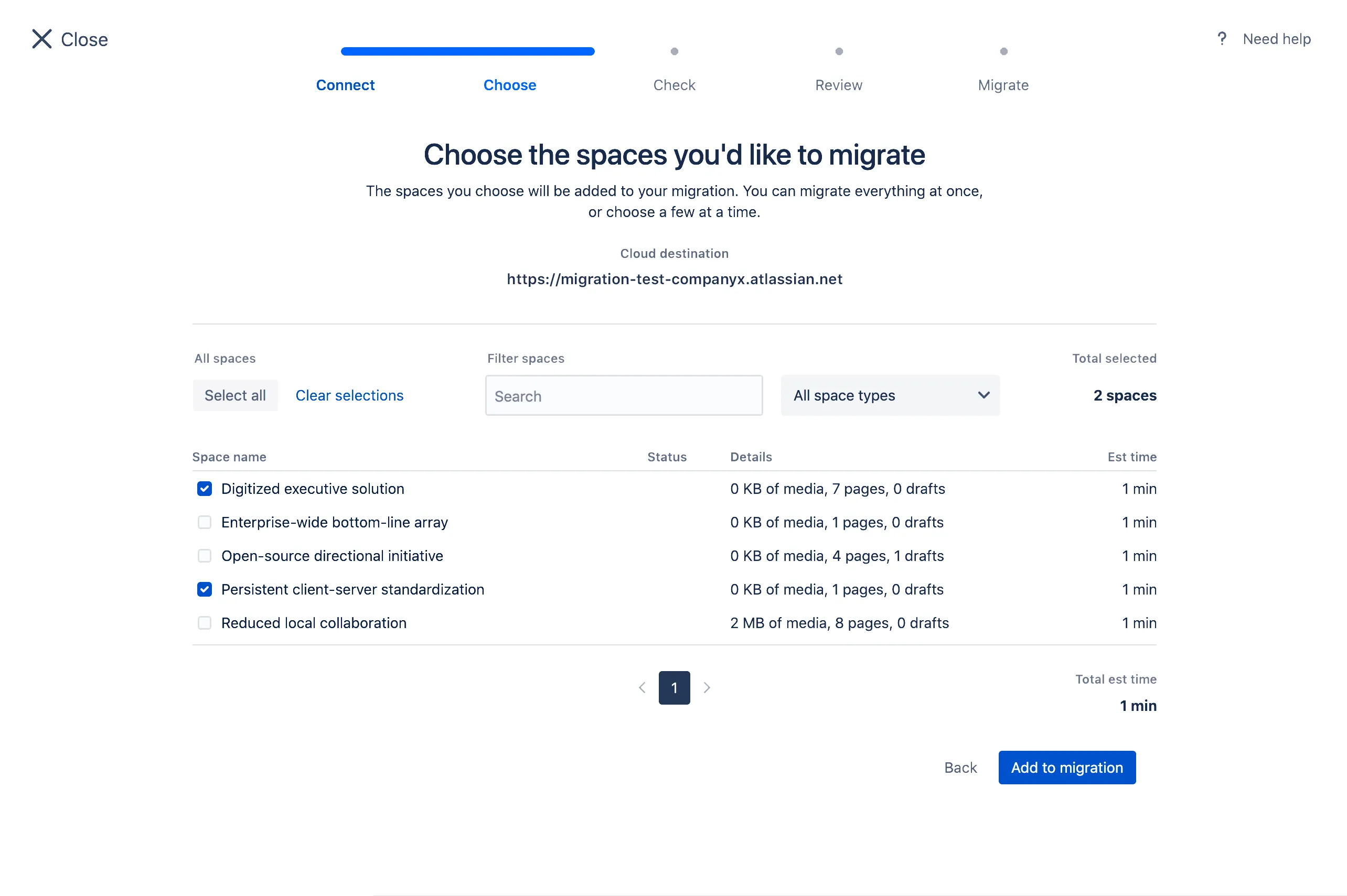
A few things to sort out before you start any migration:
Space key uniqueness is a hard requirement. Every space in your Confluence Cloud site must have a unique space key. If two of your DC instances share a space key, the migration will fail. Resolve conflicts beforehand by renaming the key in one of the source instances or by excluding the conflicting space from the initial migration.
Groups merge, but site-wide permissions don’t. If two instances have identically named user groups, the Cloud Migration Assistant will merge them into a single group in cloud. However, global settings and site-wide permissions aren’t migrated at all — you’ll need to configure those manually after migration is complete.
Migrations can’t be edited or deleted once created. Plan carefully before you run. If a migration is misconfigured, you’ll need to create a new one rather than editing the existing one.
One more important sequencing note: migrate Jira before Confluence. If you migrate Confluence first, your users will be wiped from cloud when Jira is imported later. Get Jira across first, confirm users are in place, then bring Confluence spaces over.
Ready to Plan Your Atlassian Cloud Migration?
Consolidating multiple instances before a cloud migration is one of the more complex pre-migration challenges an IT team faces. The sequencing matters, data conflicts are real, and getting it wrong — duplicated work, lost permissions, broken integrations — is time consuming to fix after the fact.
Seibert Solutions US specializes in exactly this kind of work. We’ve helped organizations untangle complex multi-instance environments and move to Atlassian Cloud with minimal disruption to the teams that depend on these tools every day.
If you’re ready to get a clear picture of what your migration will involve, book a cloud migration assessment and we’ll help you map out the right path forward.