
However, both platforms serve slightly different purposes. Understanding their strengths, limitations, and pricing can help you decide which tool best suits your team.
Jira vs. Microsoft Planner
What is Jira?
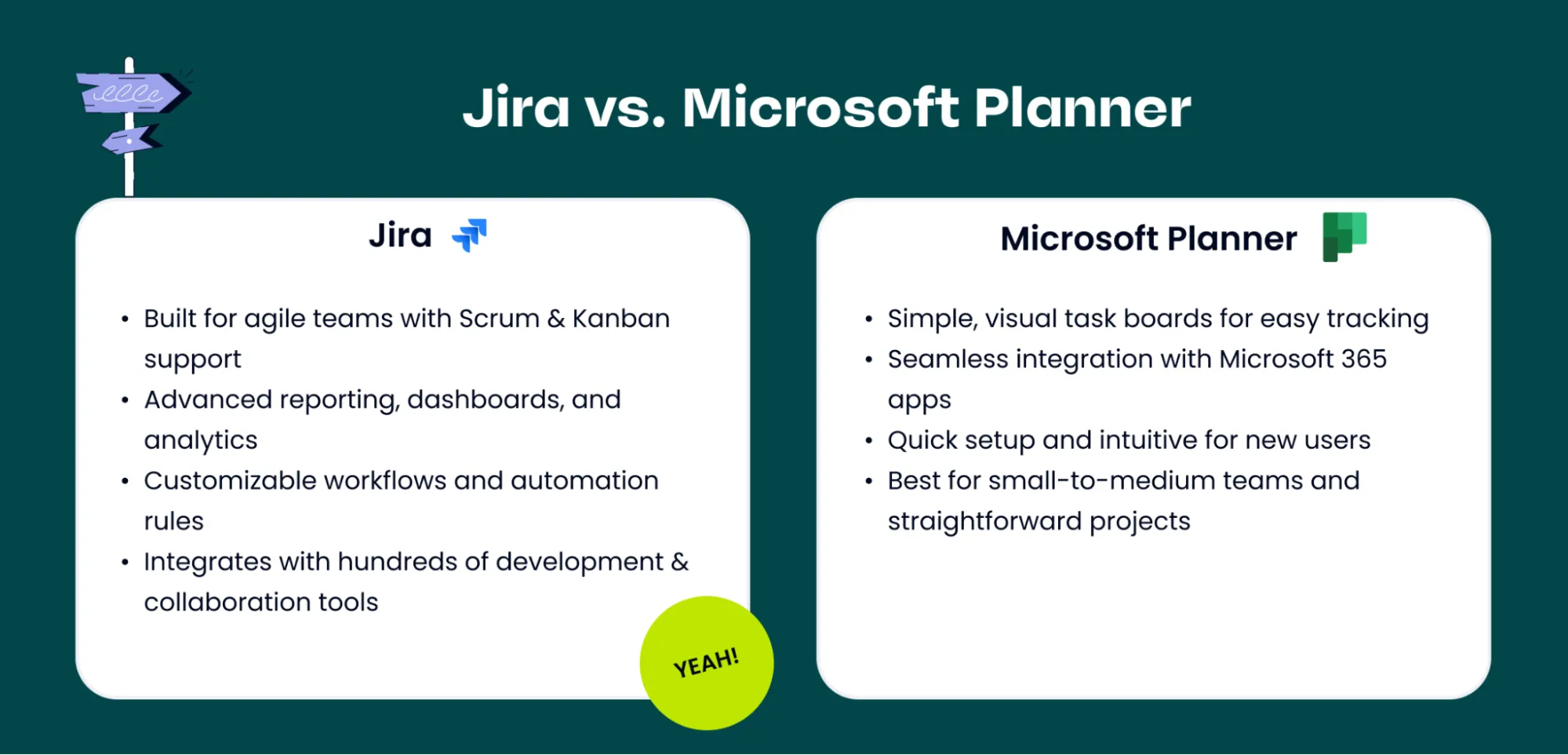
Jira, developed by Atlassian, is a powerful project management and issue tracking platform widely used by software development teams. It offers robust workflow customization, advanced reporting, and seamless integrations with development tools like Bitbucket and GitHub. Jira is designed to handle complex projects, track issues, manage agile boards, and scale with growing teams.
What is Microsoft Planner?
Microsoft Planner is a lightweight, visual task management tool included with Microsoft 365. It uses a card-and-board interface similar to Kanban, making it easy for teams to track tasks and assignments. The Planner is ideal for small to medium-sized teams that need a straightforward way to organize tasks and collaborate, without requiring advanced project management features.
Current Price Per User
Jira Pricing
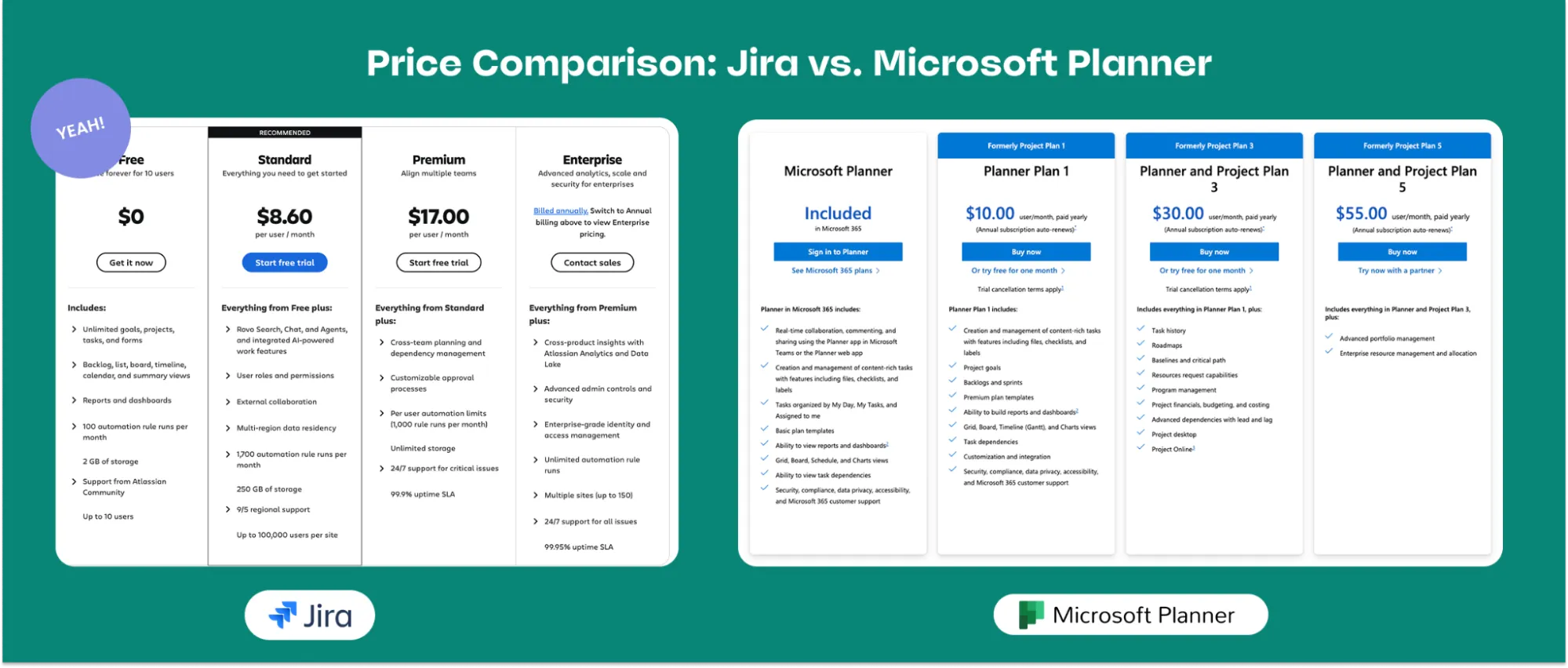
Jira’s Standard plan starts at $8.60 per user/month (based on 100 users). The Premium plan begins at $17 per user/month, with per-user costs decreasing as your team size increases. Jira also offers a free plan for up to 10 users, with access to unlimited projects.
Monday.com Pricing
Microsoft Planner is included in most Microsoft 365 subscriptions at no additional cost.
- Microsoft 365 Business Basic / Standard / Premium: Includes Planner alongside Teams, SharePoint, and Outlook
- Enterprise Plans: Available as part of Microsoft 365 E3/E5 subscriptions
Because Planner comes bundled with Microsoft 365, it is a cost-effective choice for teams already using Microsoft’s ecosystem.
Key Differences Between Jira and Microsoft Planner
- Complexity vs Simplicity: Planner is simple, intuitive, and best for lightweight task management. Jira is feature-rich and supports complex project workflows.
- Agile Support: Jira is built for Scrum, Kanban, and hybrid agile methodologies. Planner has no native agile features.
- Reporting & Dashboards: Jira provides advanced reporting, customizable dashboards, and analytics. Planner’s reporting is basic.
- Integrations: Jira connects with hundreds of third-party tools (Slack, GitHub, Confluence, Figma, Miro). Planner primarily integrates with Microsoft Teams and other Microsoft 365 apps.
- Automation: Jira supports powerful automation for tasks, approvals, and notifications; Planner offers only basic automation within the Microsoft ecosystem.
- Scalability: Jira is ideal for large projects and enterprise teams. Planner works best for small-to-medium projects.
Which Should You Choose?
- Microsoft Planner: Best for small to medium-sized teams, marketing departments, educational institutions, or any group needing a simple, visual task board. Ideal for teams already using Microsoft 365.
- Jira: Suited for technical teams, software developers, IT departments, agile teams, startups, and enterprises managing complex projects that require advanced reporting, automation, and customization.
Why Jira is Often the Better Option
While Microsoft Planner is convenient for basic task management, Jira is often the superior choice for growing teams and complex projects:
-
Advanced Workflow Customization: Jira allows you to design workflows that match your team’s exact processes, from simple task flows to multi-step approval pipelines.
-
Agile Methodologies: Jira is built for Scrum and Kanban teams, with sprint planning, backlog grooming, and burndown charts that Planner cannot match.
-
Scalable Reporting and Dashboards: Jira provides detailed analytics, customizable dashboards, and real-time project insights, empowering managers to make informed decisions.
-
Extensive Integrations: Jira connects with hundreds of tools — from development platforms like GitHub to communication apps like Slack — allowing teams to centralize project management.
-
Automation Capabilities: Jira can automate repetitive tasks, notifications, and approvals, reducing manual work and increasing team efficiency.
Both Microsoft Planner and Jira have their place. Planner is simple, cost-effective, and works well for teams already embedded in Microsoft 365. However, for teams managing complex projects, implementing agile practices, or requiring advanced reporting and automation, Jira is often the better option. Its scalability, flexibility, and integration ecosystem make it a long-term solution for high-performing teams.
See Which Plan is Right for Your Team
Selecting the right Jira plan depends on your team size and goals. Atlassian Partners can guide you through setup, migration, and customization—ensuring your team gets the most from Jira’s powerful capabilities.