
One of the most common reasons Atlassian Data Center migrations stall isn’t licensing, budget, or executive buy-in — it’s a single app. A workflow your team depends on, a plugin that’s become part of how work gets done, with no Cloud equivalent in sight. The good news: this is a solvable problem, and you have more options than you might think.
Why the App Gap Is Such a Common Blocker
When organizations move from Jira or Confluence Data Center to Cloud, the Atlassian Marketplace doesn’t always come with them. Some apps were built specifically for the Data Center or Server environment and were never ported to Cloud. Others were discontinued. A few are in development — but “coming soon” doesn’t help you hit a migration deadline.
The result is an app gap: a list of tools your team relies on that have no direct Cloud equivalent. Left unaddressed, this gap can freeze a migration entirely or force a messy compromise where teams work around missing functionality.
The fix starts with a clear picture of what you’re actually dealing with.
Step 1: Audit Your App Inventory First
Before making any decisions, do a structured audit of every app currently running in your Data Center instance. Categorize each one:
- Available on Cloud: confirmed Cloud version exists on the Marketplace
- Has a Cloud alternative: a different app covers the same use case
- No equivalent found: nothing comparable exists yet
This audit is the foundation. Without it, you’re guessing at the scope of your migration challenge. We’ve put together a detailed guide to running this process: How to Audit Your Marketplace Apps Before Migrating to Atlassian Cloud.
The output should be a clear list of genuine gaps — apps that are truly blocking your move to Cloud. That list is what drives the next steps.
Step 2: Check for Cloud-Native Alternatives
Once you have your gap list, don’t assume custom development is the immediate answer. The Atlassian Cloud Marketplace has grown significantly, and some Data Center apps have been replaced by native Cloud features you may not have noticed yet.
A few things worth checking before writing off an app:
- Native Cloud features: Atlassian has built a lot of functionality directly into Cloud that used to require a plugin — automation rules, Atlassian Intelligence, advanced roadmaps, and more. An app you’re relying on may now be redundant.
- Rebranded or rebuilt tools: Some vendors discontinued their DC app and released a new Cloud-native version under a different name. Linchpin, the popular Data Center intranet app, is a good example — its Cloud equivalent is Mantra. Search by use case, not just by the original app name.
- Equivalent third-party apps: A competitor may have built what your original vendor didn’t. A quick search filtered to “Cloud” on the Marketplace is worth the twenty minutes.
This step often closes more gaps than expected. But not all of them.
Step 3: Evaluate What Each App Actually Does
Before investing in any replacement — custom-built or otherwise — it’s worth asking whether the app needs replacing at all.
Data Center gave admins a lot of flexibility, and over the years many teams built workflows around plugins that were solving problems Cloud doesn’t actually have. Some apps existed to compensate for DC limitations: performance workarounds, permission hacks, bulk operation tools that are now native in Cloud.
For each remaining gap on your list, ask:
- Is this solving a genuine business requirement, or a DC-era workaround?
- Do the people who use this app actually need this exact functionality, or has the underlying need evolved?
- Would we build this from scratch today if we were starting fresh on Cloud?
Rationalize before you rebuild. Only carry forward what’s genuinely needed.
Step 4: When Jira Custom Development Is the Right Answer
After the audit, the alternatives check, and the rationalization pass, you’ll likely have a short list of apps with no suitable replacement. These are the ones worth investing in.
This is where Jira custom development comes in. Rather than blocking your migration or accepting a degraded workflow, you commission a Cloud-native app built specifically for your requirements — not a port of the old tool, but something designed for how Cloud actually works.
What Jira custom development typically covers in this context:
- Forge and Connect apps: Atlassian’s official Cloud development frameworks, built for security, performance, and Marketplace compatibility
- Workflow extensions: Custom post-functions, validators, and conditions that replicate complex Data Center workflow logic
- Integrations: Connecting Jira or Confluence Cloud to internal systems, external services, or data sources that the old plugin handled
The key advantage over trying to force-fit an existing alternative is fit: a custom-built app does exactly what your team needs, built on Cloud-native architecture from day one.
Seibert’s custom development team works with organizations at exactly this stage of migration — when the standard path runs out and you need something built to spec. Learn more about our Jira custom development services.
A Simple Decision Framework
If you’re working through a list of app gaps and need a quick way to prioritize, this framework covers most situations:
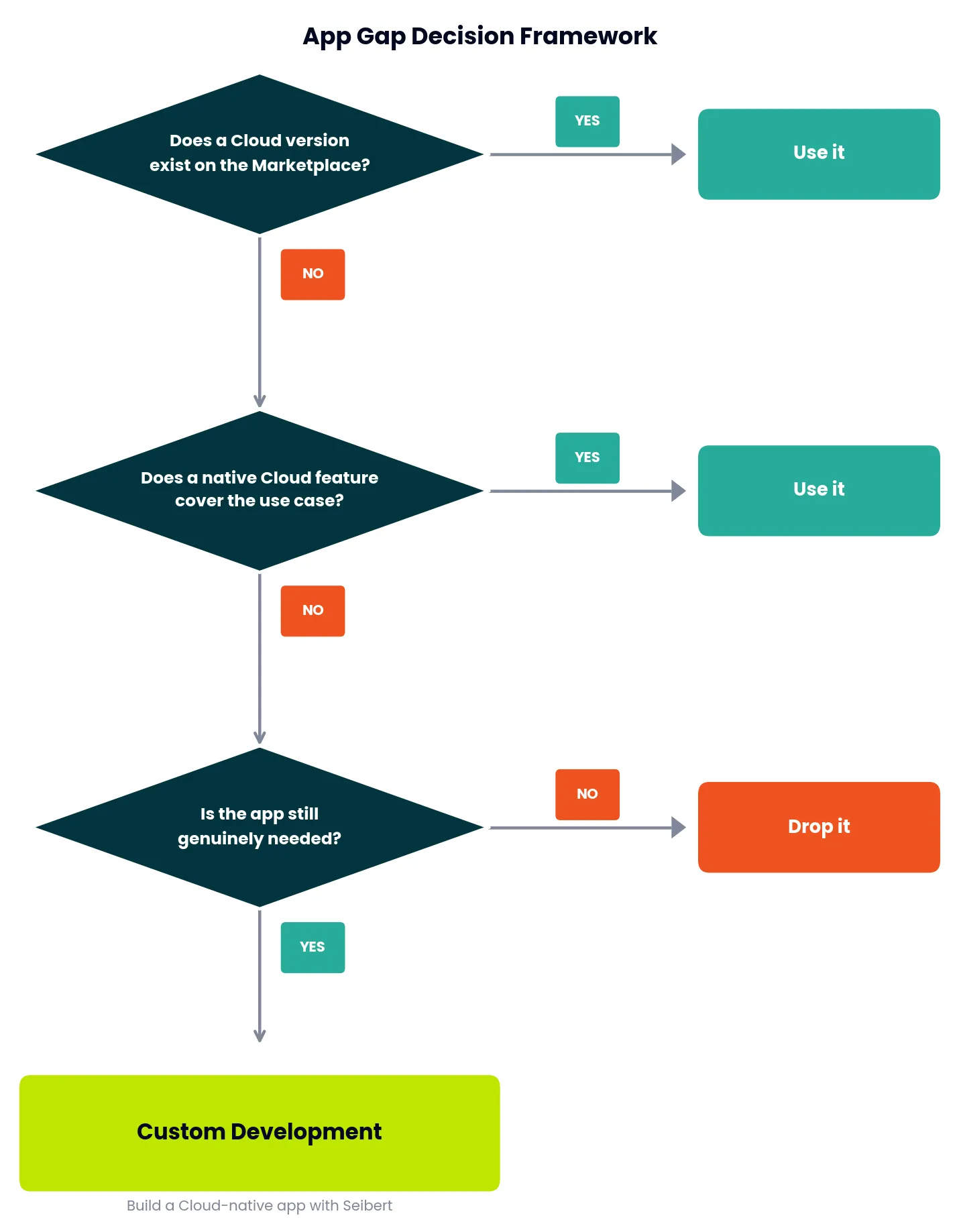
- Cloud version exists on the Marketplace → Use it, validate feature parity, migrate
- Native Cloud feature covers the use case → Drop the app, adopt the native feature
- A Cloud-native alternative app exists → Evaluate it, pilot with the team
- The app is no longer genuinely needed → Retire it, document the decision
- None of the above → Jira custom development is the path forward
Most migrations see the majority of gaps resolved by steps 1–4. Custom development is the right call for what’s left — and it’s far better than letting a handful of apps hold up an otherwise ready migration.
Don’t Let an App Gap Stall Your Migration
A missing Cloud equivalent isn’t a reason to stay on Data Center. It’s a scoping problem — and scoping problems have solutions.
If you’ve done the audit, checked the alternatives, and you still have apps with no suitable replacement, let’s talk. Seibert’s custom development team can assess what it would take to build Cloud-native equivalents and get your migration back on track.