
When teams need a robust collaboration and knowledge-sharing platform, Confluence and SharePoint are often the top two contenders.
Both platforms help teams organize information, enhance collaboration, and make work more transparent. However, their strengths differ, and depending on your organization’s goals, one may be a better fit than the other.
Confluence vs SharePoint
What is Confluence?
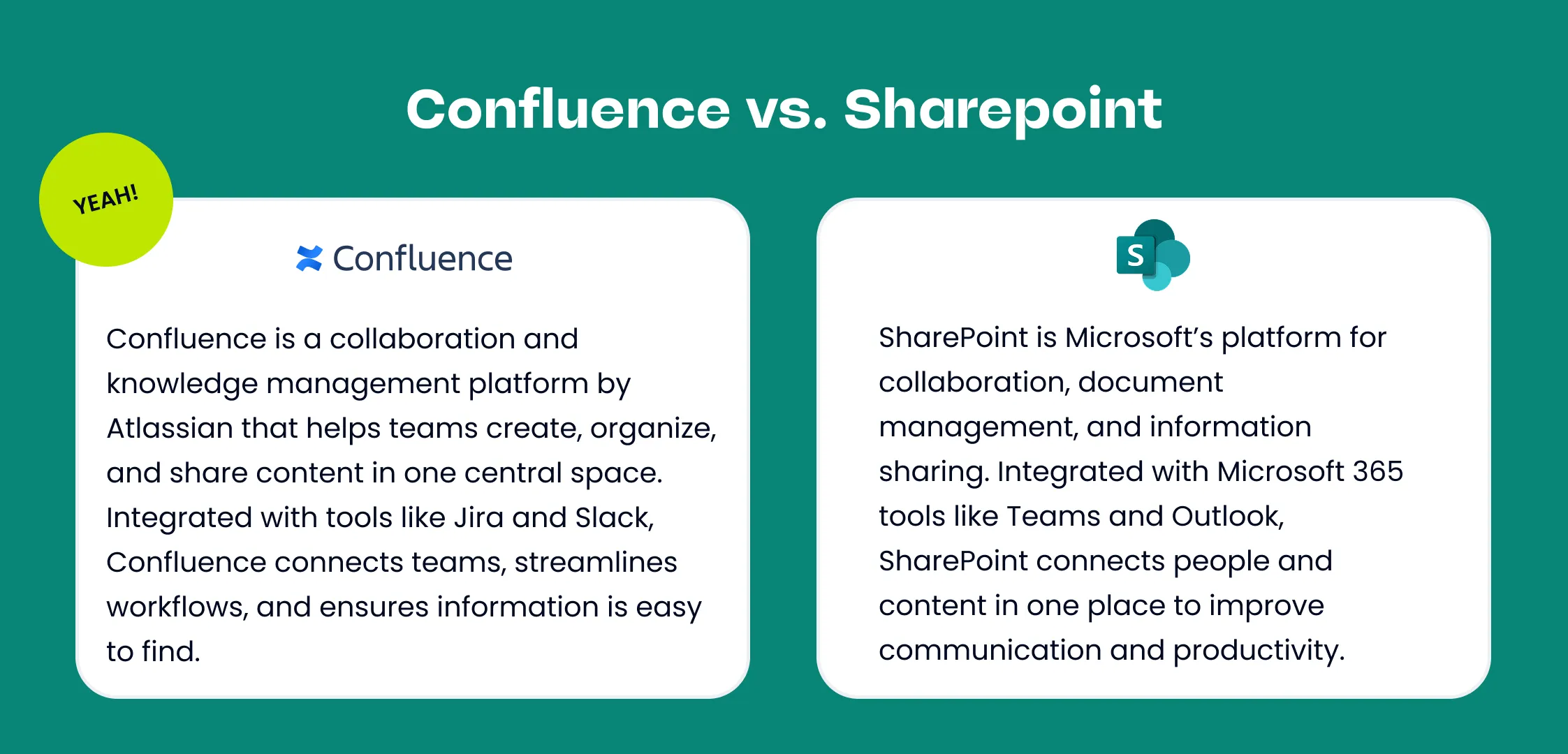
Confluence, by Atlassian, is more than a document editor. It’s a knowledge management platform and collaboration hub where your team’s work lives in one place.
Key advantages of Confluence include:
- Dedicated Spaces for teams, projects, and company-wide content.
- Page tree hierarchy for structured organization and navigation.
- Open by default content with flexible permission controls.
- Advanced search and labels to keep information discoverable.
- Over 100 templates tailored for HR, IT, marketing, product, and more.
- Deep integrations with Jira, Trello, Slack, and 3,000+ other apps.
- Visual collaboration with built-in whiteboards, roadmaps, and macros.
Confluence serves as a single source of truth, making it an ideal choice for organizations seeking to align projects, processes, and people within a single, connected workspace.
What is SharePoint?
Microsoft SharePoint is a platform for enterprise content management, intranets, portals, and structured document storage. Historically born as a document repository and collaboration framework, SharePoint now sits at the center of Microsoft 365’s file, portal, and intranet capabilities.
Key strengths:
- Powerful document management, versioning, and approval workflows.
- Deep integration with Microsoft 365 apps (OneDrive, Teams, Outlook, Power Automate, Power Apps).
- Enterprise intranet and portal capabilities — tailored pages, sites, and hubs for departments and the organization at large.
- Strong governance and compliance features for regulated environments.
- Highly extensible: developers can create custom web parts, integrations, and business solutions.
SharePoint is often chosen when an organization needs enterprise-grade document controls, an internal portal/intranet, or heavy customization inside the Microsoft ecosystem.
Current Price Per User
Important note: software pricing changes regularly. Below are the current public list prices from vendor pages and Microsoft’s plan pages. Always double-check vendor pages for the most current rates and discounts for annual billing, education/nonprofit discounts, or enterprise agreements.
Confluence Pricing (Atlassian)
Atlassian lists Confluence Cloud plans including Free, Standard, Premium, and Enterprise tiers. Public list pricing for cloud plans (per user, monthly, billed annually) typically includes:
- Free — up to a small number of users with basic features.
- Standard — core collaboration features; commonly used by small-to-mid teams.
- Premium — additional admin controls, analytics, unlimited storage, and SLA-backed uptime.
- Enterprise — custom pricing for large organizations with advanced security and deployment requirements.
- Confluence’s pricing page show the Standard/Premium tiers with per-user pricing listed on Atlassian’s site.
SharePoint Pricing (Microsoft)
SharePoint is available as a standalone service or as part of Microsoft 365 bundles. Typical pricing options include: SharePoint Online (Plan 1) — entry-level, focused on team sites and simple document storage (per user/month).
- Microsoft 365 Business Standard
- Microsoft 365 Business Standard (No Teams)
- Microsoft 360 Copilot
Many organizations get SharePoint via Microsoft 365 subscriptions rather than standalone because the bundles add Teams, Exchange, and Office.
Key Differences Between Confluence and SharePoint
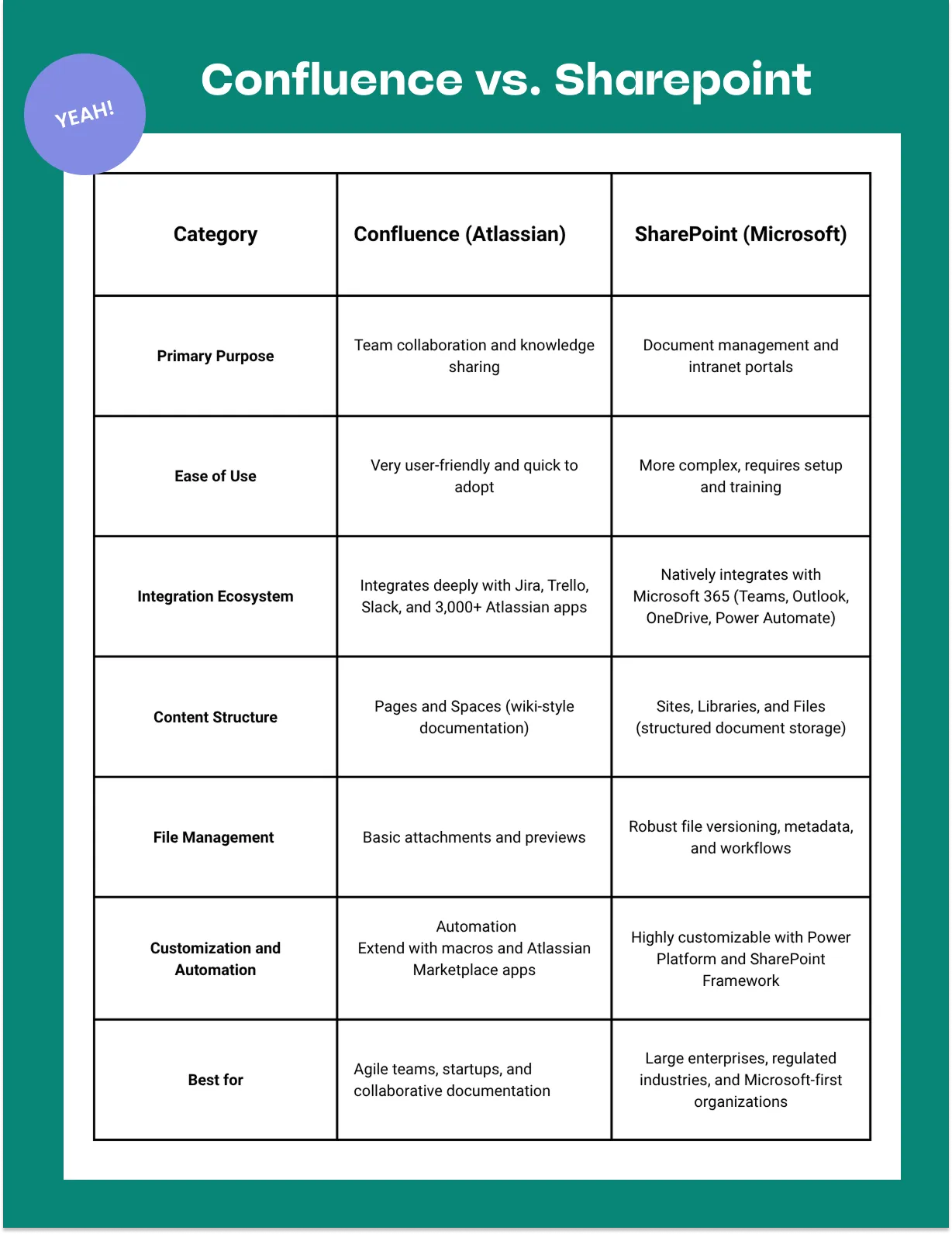
Here are the primary axes where the two platforms differ:
- Primary use case Confluence: Knowledge base, documentation, meeting notes, playbooks — optimized for unstructured content and collaborative writing.
SharePoint: Document management, intranet/portal infrastructure, and structured content with robust enterprise controls.
- Document vs. knowledge mindset Confluence treats content as living pages that teams create and evolve. It’s optimized for search, linking pages, and simple structure.
SharePoint treats content as files and lists with lifecycle management, metadata, and complex permission models.
- Integrations & ecosystem Confluence integrates deeply with Jira and the Atlassian ecosystem; strong marketplace of add-ons for documentation, diagrams, and macros.
SharePoint integrates natively with Microsoft 365 — Teams, OneDrive, Power Platform (Power Automate, Power Apps) — making it ideal when your org is Microsoft-first.
- Ease of use & adoption Confluence typically offers a gentler learning curve for writers and agile teams — simple editor and templates.
SharePoint can be more complex to configure and govern, but it’s extremely powerful once set up (site templates, web parts, workflows).
- Governance and compliance SharePoint has richer built-in enterprise governance, DLP, compliance & retention controls when used with Microsoft 365 E3/E5.
Confluence has good access control and audit features (especially at Premium/Enterprise tiers), but heavy compliance scenarios are typically better handled in the Microsoft stack
- Customization and developer extensibility SharePoint supports developer-built web parts, SPFx, and Power Platform integrations for low-code solutions.
Confluence allows marketplace apps and REST APIs; customization is usually feature-focused (macros, add-ons).
Which Should You Choose?
There’s no one-size-fits-all answer. Use the short decision guide below:
Choose Confluence if: Your priority is knowledge sharing: central docs, runbooks, meeting notes, documentation that teams contribute to constantly.
Your teams already use Jira or other Atlassian tools — integration creates a clean trace between work and documentation.
You want a fast, friendly editor and information architecture organized by spaces/pages.
You favor a lighter administration model and quicker user adoption.
Choose SharePoint if:
You need enterprise document management, records retention, or advanced compliance controls.
Your organization is Microsoft 365-first (heavy Teams, OneDrive, Outlook usage) — SharePoint comes baked into that ecosystem.
You require a full intranet/portal experience with departmental sites, internal news, and highly customized pages.
You must support complex document workflows, approvals, or industry-specific governance.
Hybrid approach (most common in mid-to-large orgs)
Many organizations use both: SharePoint/OneDrive for document storage and compliance, and Confluence as the living knowledge base. Integration points and connectors mean you don’t have to choose one exclusively; instead, architect each tool for what it does best. Atlassian themselves publish guidance on when to use each tool.
Why Confluence is Often the Better Option (for many teams)
Confluence is frequently recommended — and often selected — for the following concrete reasons:
Writer-first UX: Confluence’s editor and page model make it fast to capture knowledge. Teams that document processes, runbooks, and product specs find it more natural than file-based interfaces. This lowers friction for documentation and raises knowledge capture.
Knowledge architecture: Spaces and page hierarchies are intuitive for teams and departments. Discovery is simpler because content is designed to be read and linked, not just stored.
Seamless developer/workflow integrations: If your organization uses Jira or Atlassian tools, linking tickets to docs, embedding dynamic reports, and surfacing Jira issues in docs is straightforward — boosting traceability between work and decisions.
Faster adoption: Many teams report quicker onboarding and more frequent contributions because Confluence reduces the friction of creating and updating content compared to folder-and-file mental models.
Built for collaboration, not just storage: Confluence encourages collaborative editing, inline comments, and iterative content creation which maps well to modern agile and cross-functional teams.
See Which Plan is Right for Your Team
Selecting the right Confluence plan depends on your team size and goals. Atlassian Partners can guide you through setup, migration, and customization—ensuring your team gets the most from Confluence’s powerful capabilities.